Field NotesCORENET XIFC-SGBIM ComplianceRevitGatewayValidation
Presence is not correctness
In BIM submission workflows, a populated parameter can still be wrong. This note separates parameter presence from parameter correctness, then shows why exported-file validators accumulate drift when teams are still working inside Revit.
Adib Zailan
March 14, 2026Updated July 23, 2026
8 min read
In submission week, validation does not happen against a static file. It happens while the authoring model is still moving. Rooms are renumbered, parameters are corrected, elements are replaced, and several people may be worksharing into the same Revit model while a validator report is already open in another window.
In that setting, the question is not only whether the model has missing fields. The harder question is whether the values already in the model are correct for the element, the building, and the agency rule being tested.
That distinction creates two different validator classes: systems that check parameter presence, and systems that check parameter correctness. They sound similar. They support very different decisions.
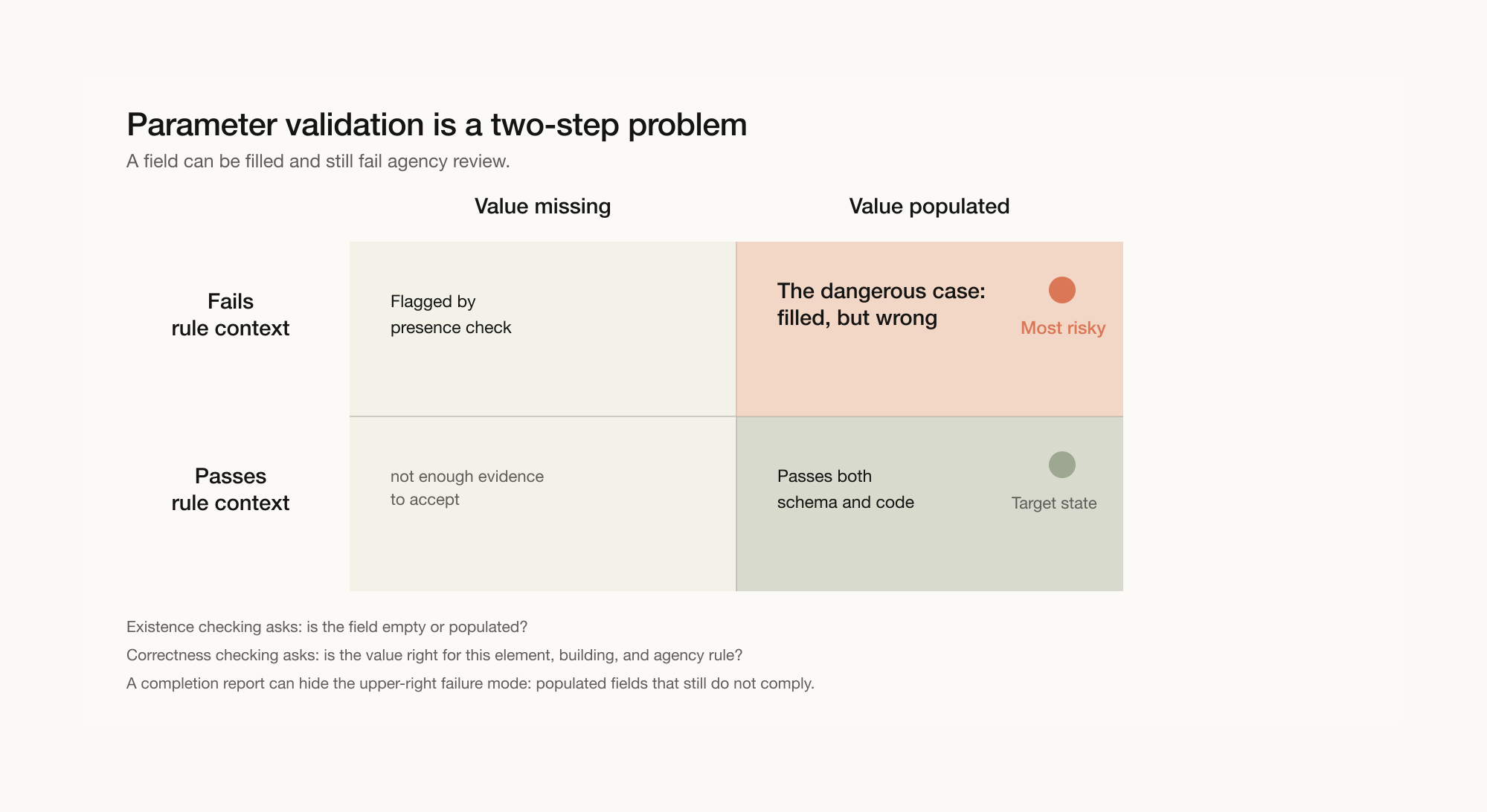
Observation: completion is not compliance
A presence checker asks a narrow question: is the required field empty or populated?
If an IfcDoor has no fire rating property, the field is flagged. If an IfcSlab lacks a required accessibility parameter, it appears in the report. On a large model, this is useful triage. It tells the team where information is absent.
Some validators group these gaps by entity type, floor level, or agency. If 60% of your missing parameters are accessibility fields on Level 3, the team can work through them systematically. That kind of triage is valuable.
But the check stops at presence. Once the field is filled, the presence checker has finished its job. It does not evaluate the value.
Correctness checking begins where schema checking stops
Correctness checking is harder because compliance is contextual. A wall, door, room, slab, or opening may carry the required parameter and still carry the wrong value. The correct value depends on what the element is, where it sits, how it is used, and which rule applies.
An existence checker can tell you that two walls need a fire rating field. It will not necessarily tell you that one wall should carry FRP 120 while another should carry FRP 60. It may not notice if someone typed 1 hour, a value that exists but does not match the required CORENET X format.
This is where schema and code separate. The IFC-SG schema defines what fields must exist. Agency rule sets define what values belong in those fields. BCA, SCDF, NEA, URA, and other requirements do not merely ask whether data exists. They ask whether the model represents the correct condition.
A model can show 4,200 populated fields out of 5,000. That sounds reassuring. But populated and correct are not the same. The checkmark only says the field was filled. It does not say the submission will pass review.
When two tools create one reconciliation problem
If your validator only checks presence, you will need another way to check correctness. Some tools acknowledge this directly. They direct users to a second checker for actual compliance verification against building codes.
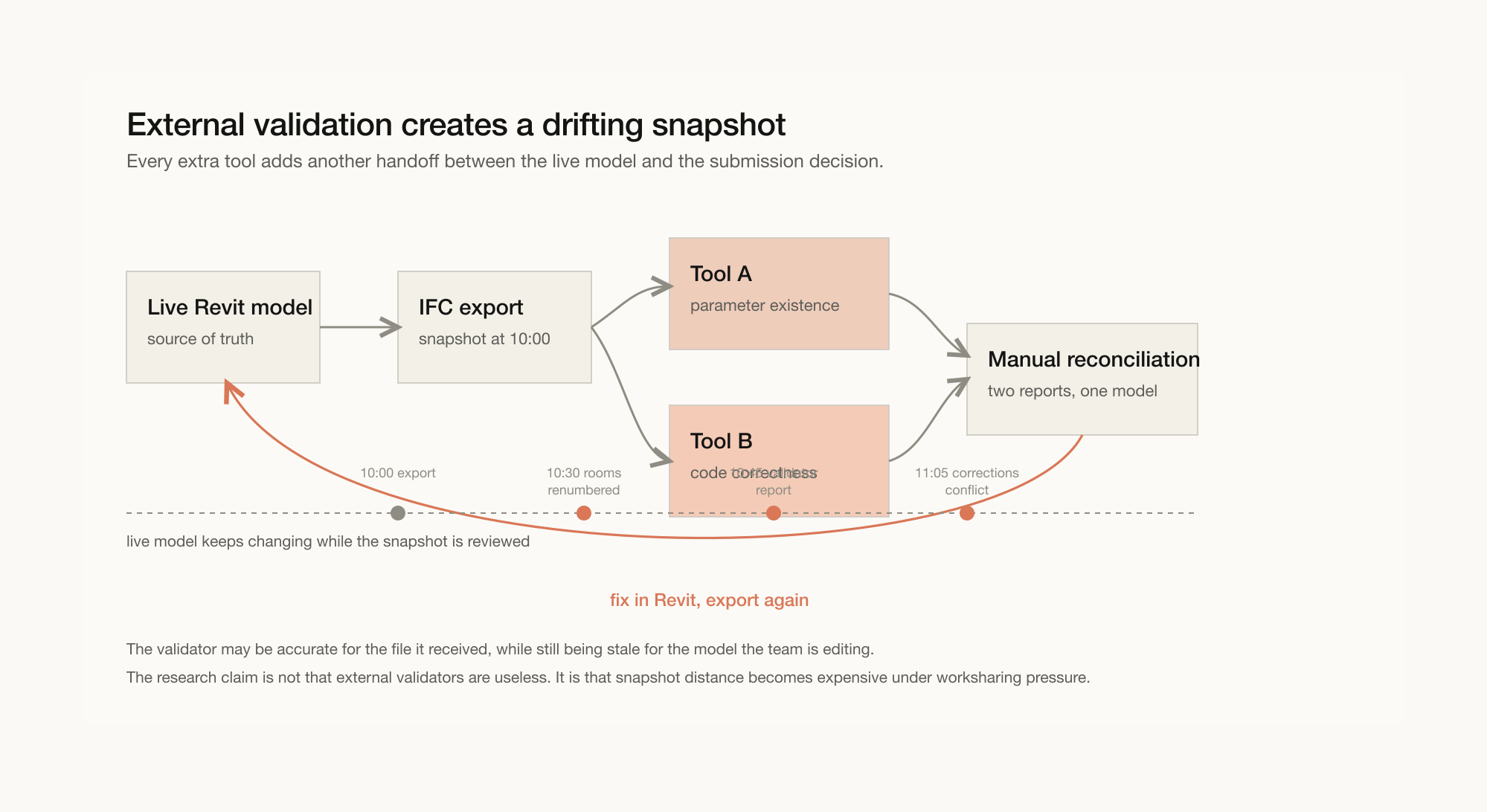
The workflow becomes familiar: export IFC from Revit, upload to Tool A for parameter presence, fix empty fields, upload to Tool B for compliance checking, discover that some values are wrong, go back to Revit, fix the values, re-export, re-upload, and repeat.
Two tools. Two interfaces. Two report formats. One live model.
The deeper cost is not only the context switching. It is reconciliation. When Validator A says the field is populated and Checker B says the value is wrong, the practitioner has to interpret two different systems against the model that neither tool fully sees.
I covered the export-upload-fix loop in detail in What BIM Validation Actually Costs Your Team. Adding a second tool to that cycle makes the coordination problem more visible, not less.
Snapshot distance
External validation introduces snapshot distance.
A browser validator may be perfectly accurate for the IFC file it received. But if the Revit model changes while the report is being reviewed, the report is now accurate for a state of the project that no longer exists.
This is why the export-upload-fix loop becomes expensive under worksharing pressure. Each external tool adds another handoff between the live model and the submission decision.
If you have been in a BIM team during submission crunch week, you know how this feels. Revit is open. Navisworks is open. A coordination platform is open. Someone has a validator in a browser tab. Someone else is cross-referencing an IFC-SG mapping table. The model lives in a shared environment, and five people are still making changes while one person is triaging an export from earlier in the day.
You learn quickly that every external tool is another place where reality branches. The Revit model is the source of truth. It is where the team is actively working. It is what will eventually be exported for submission. Every tool that asks you to upload a snapshot, read a report elsewhere, then return to Revit puts distance between the feedback loop and the model.
The external validation workflow resembles a consulting engagement because that is often how it was designed: hand off the file, receive a report, reconcile. When another party is doing the analysis, that model can make sense. When the project team is doing the fixing on a deadline, in a live model with several people working in it, it creates friction.
The fewer handoffs between the model and the submission decision, the less drift accumulates. That is not a design preference. It is an operational condition.
Combined checking keeps feedback close to the model
A rule-aware workflow collapses two checks into one decision: is the parameter present, and is the value appropriate for this element under the applicable rule context?
The important shift is not merely automation. It is where the decision is made. If the check happens inside the authoring environment, the feedback loop stays closer to the source of truth. The practitioner reviews the result in context, fixes the model directly, and exports once the model is ready.
That is schema validation versus compliance validation. Schema validation asks: is the field there? Compliance validation asks: given this building code, this element's location, this occupancy type, and this agency rule, is the value correct?
In previous authority submission work, the hard part was rarely finding empty fields. Those were usually caught early. The time went to determining correct values for each element: fire ratings, accessibility widths, egress calculations, material grades, and other values that depend on rules outside the IFC schema.
This is why validating inside Revit, before export, changes the equation. No browser tab, no snapshot queue, no asynchronous drift between the model and the feedback loop. The tool can read the live model, show the problem in context, and let the practitioner decide what to fix before the IFC is produced.
I wrote more about that upstream workflow in How to Validate CORENET X Compliance Before IFC Export.
Questions for evaluating a validator
If you are evaluating compliance tools for October 2026, note that new projects with GFA of 5,000 m² and above must use CORENET X from 1 October 2026, while projects below 5,000 m² may continue using CORENET 2.0 for now, according to BCA's 22 July 2026 media release. The useful questions are simple.
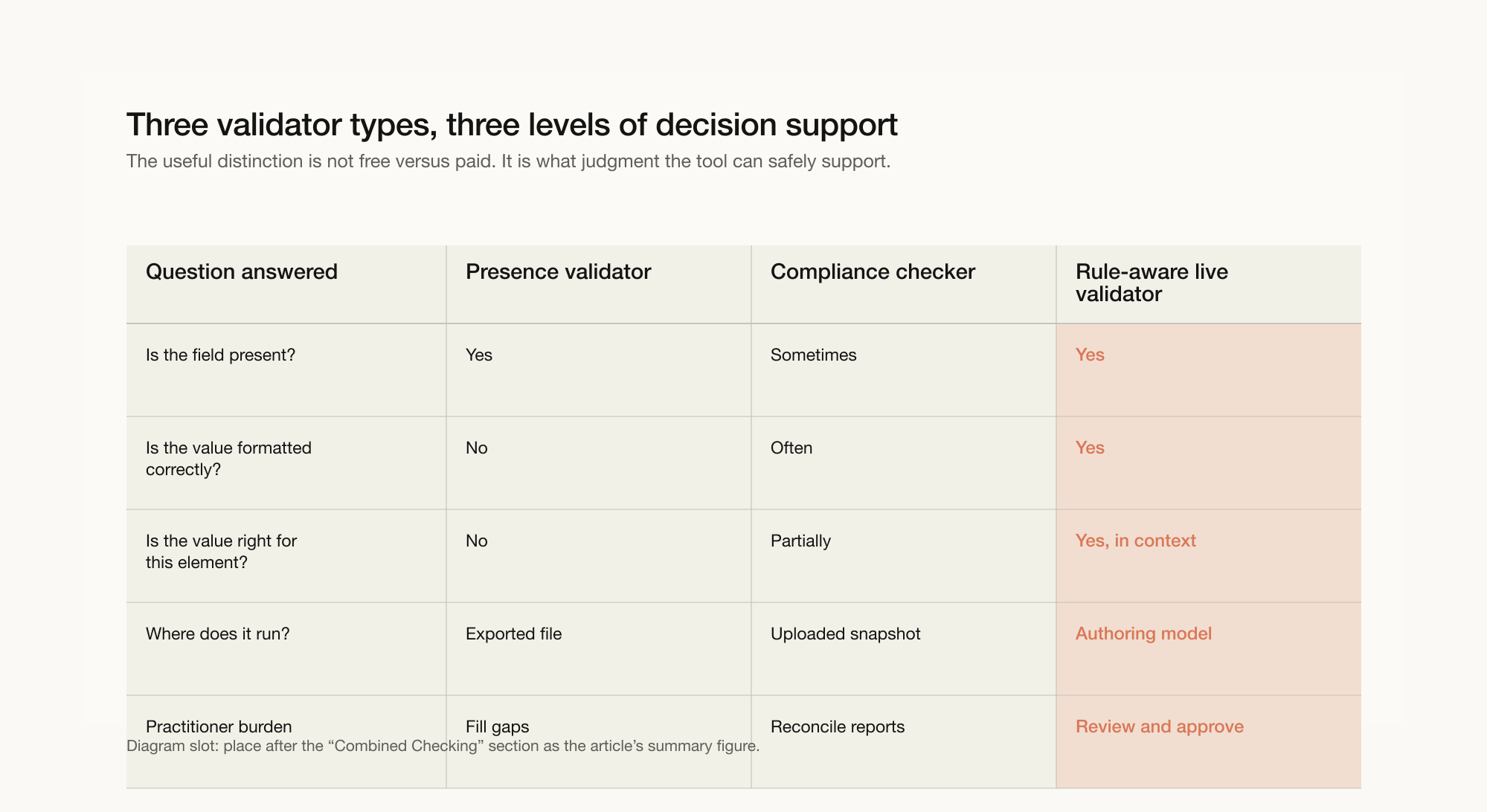
Does it check presence, correctness, or both?
Presence checking is useful for finding obvious gaps. It does not tell you whether a populated field will pass agency review.
Does validation happen on an exported snapshot or the live authoring model?
If validation happens in a browser on an IFC export, the report is separated from the model your team is editing. If validation happens inside Revit, the feedback loop stays closer to the source of truth.
When does it flag problems?
Post-design validation tells you what is wrong in a model you thought was finished. The costliest failures surface after coordination decisions have hardened. The earlier a validator can surface rule issues, the cheaper they are to fix.
A presence-only validator is still useful. It removes obvious gaps. But for production workflows with live models and real submission deadlines, the more important question is whether the tool can distinguish a filled field from a correct one.
Senibina studies where AEC coordination breaks, turns those observations into workflow experiments, and packages the useful experiments into tools for practice. This field note is part of that research.
If your practice is preparing for October 2026 and wants to study rule-aware IFC-SG preparation inside Revit, Gateway is in alpha with founding firms. The program is open to firms preparing their CORENET X submission strategy.
Related resources
- Free CORENET X Parameter Lookup ToolSearch 500+ IFC-SG parameters instantly
- Senibina-Gateway, IFC-SG Preparation Inside RevitPrepare before you export
- More Research notes on IFC-SG preparation