Field NotesCORENET XIFC-SGBIM ComplianceRevitWorkflowValidation
The invoice misses the loop
Free BIM validation tools can be useful health checks. The hidden cost appears when teams turn exported-file reports into a repeated production workflow while the Revit model is still changing.
Adib Zailan
February 27, 2026Updated July 23, 2026
8 min read

The tool was free. The afternoon was not.
That is the basic accounting problem with many BIM compliance tools. The invoice shows zero, or close to zero. The project team pays somewhere else: in exported files, waiting time, report triage, model lookup, and the strange work of deciding whether a validation report is still true after the Revit model has already changed.
This is not an argument against free tools. A free checker can be useful. It can reveal missing properties, malformed IFC entities, and submission risks before a formal upload. The problem begins when a free checker becomes the production workflow.
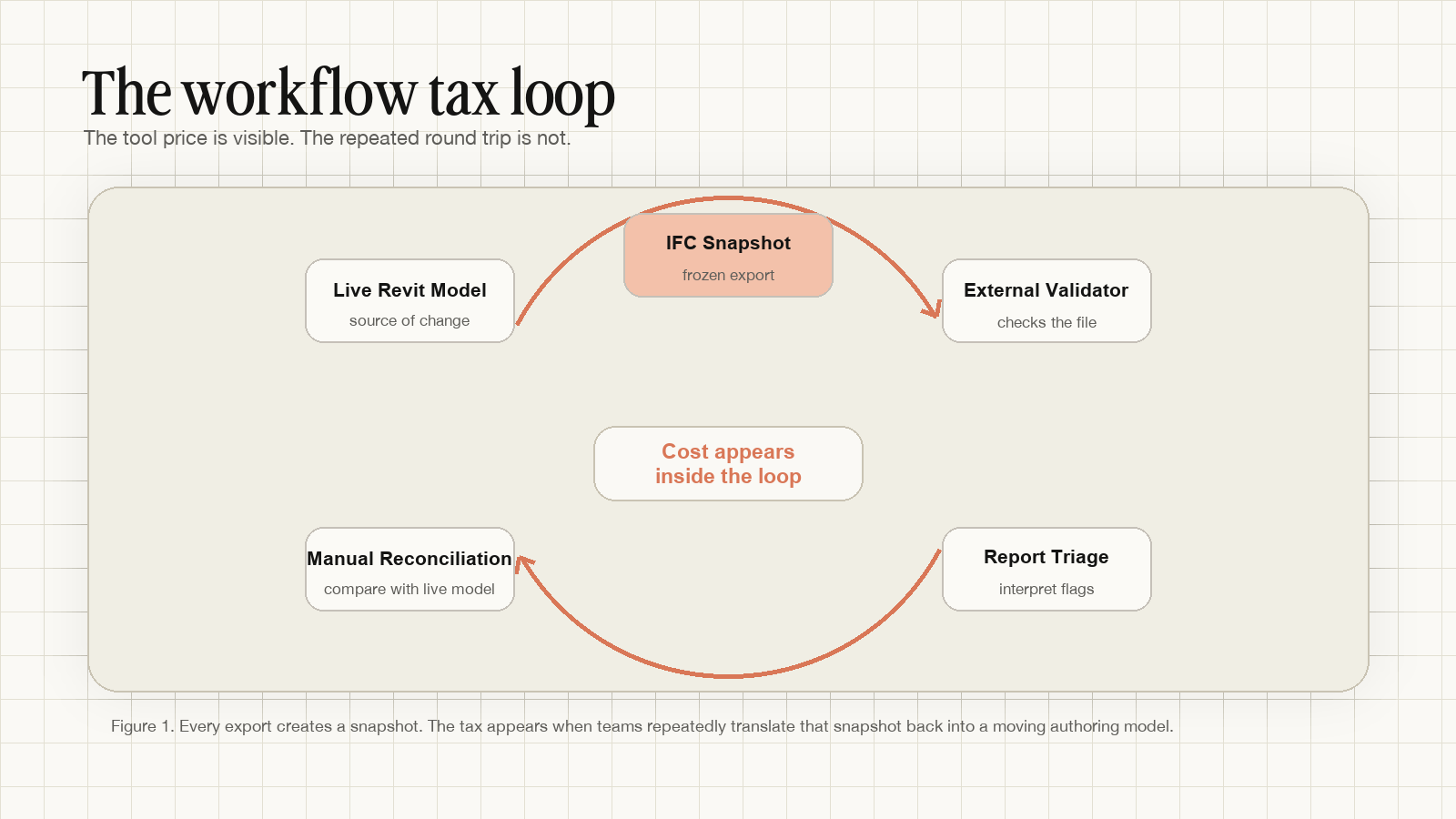
In that workflow, the cost is not the tool. The cost is the loop.
Observation: free is not the same as low cost
A web-based IFC validator has a simple promise. Export from Revit, upload the file, wait for processing, read the report, fix the issues, export again, and repeat until the report looks clean enough for submission.
On a small test model, this feels reasonable. On a live project, the equation changes. The export takes time. The upload takes time. The report needs interpretation. Someone has to find each issue back in Revit. Someone has to decide whether the flag is a real problem, a modelling convention, a mapping issue, or a stale condition from an older export.
In field use, a single export-upload-review round can easily consume 20 to 40 minutes before any meaningful fix is made. Larger submission models can take longer, especially when export settings, property mapping, and model size are all in play. Four or five rounds later, the tool may still be free. The afternoon is gone.
The distinction matters because Singapore's CORENET X timeline is no longer theoretical. BCA's 22 July 2026 media release states that, from 1 October 2026, new projects with GFA of 5,000 m² and above must use CORENET X. Projects below 5,000 m² may continue using CORENET 2.0 for now. The IFC-SG workflow is therefore especially material for practices working on qualifying projects, while teams below the threshold can still use Gateway if they want to prepare early.
That makes 2026 a workflow-testing year, not just a software-shopping year.
The workflow tax hides outside the invoice
The visible price is easy to compare. Licence fee. Per-upload fee. Consulting fee. Free tier. Trial period.
The operating cost is harder to see. It sits around the tool, not inside it.
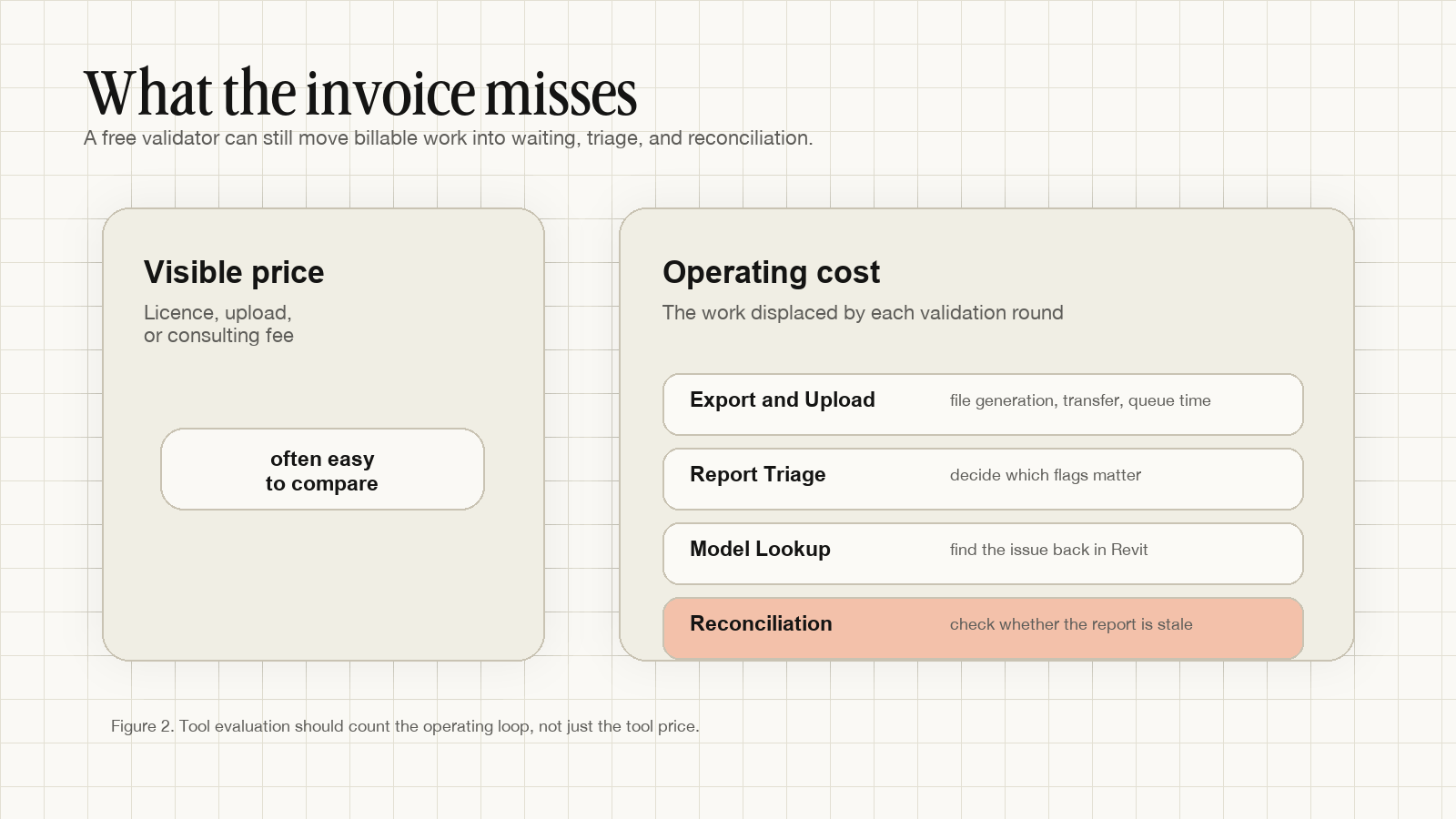
There are at least four hidden work items in a post-export validation loop.
First, export and upload. The team has to generate the IFC snapshot, move it into the validation tool, and wait for the tool or reviewer to return a result. This may be quick on a test file. It is rarely invisible on a project model.
Second, report triage. The report tells you what the exported file contains. It does not automatically tell you which flags matter for your current submission, which are false positives, which were caused by modelling convention, and which are downstream symptoms of a wrong mapping choice.
Third, model lookup. Someone has to find the element, room, wall, door, space, or property back in Revit. The report and the model do not always speak the same visual language.
Fourth, reconciliation. The validator checked an IFC snapshot. The model may have moved since that snapshot was created. In a workshared file, other people may be editing rooms, properties, families, and levels while the report is open. The report can be accurate for the file and stale for the model.
This is the same failure mode described in Filled is not compliant, but seen from the project-management side. The compliance risk is not only that a field is missing or wrong. The workflow risk is that every correction has to travel through a stale snapshot before it becomes trusted again.
A field note from authority submission work
On a previous authority-submission project, I watched this loop consume competent people's time. The team was not careless. The BIM manager understood the model. The coordinator knew how to inspect the IFC. The modeller knew where the Revit fixes belonged.
The problem was not skill. It was handoff geometry.
The model lived in one place. The validation report lived somewhere else. The file being checked was an exported version of the model, not the live model itself. Every issue had to be translated back into the authoring environment, corrected, exported, and checked again.
That round trip is tolerable once. It becomes expensive when the team is doing it against a deadline, across multiple disciplines, with agency requirements still being interpreted.
Good tools can reduce the pain. They cannot remove the basic constraint if their only input is an exported file.
The tool posture matters
There is a better question than “is this validator free?”
Ask: where does this tool ask my team to work?
Some tools are snapshot checkers. They inspect an exported IFC and produce a useful report. Some tools are consultant review workflows. They combine model checking with human interpretation, which can be valuable when the project is ambiguous or already in trouble. Some tools operate closer to the authoring context. They check the model while the team is still able to act on the result directly.
Those postures are not interchangeable.
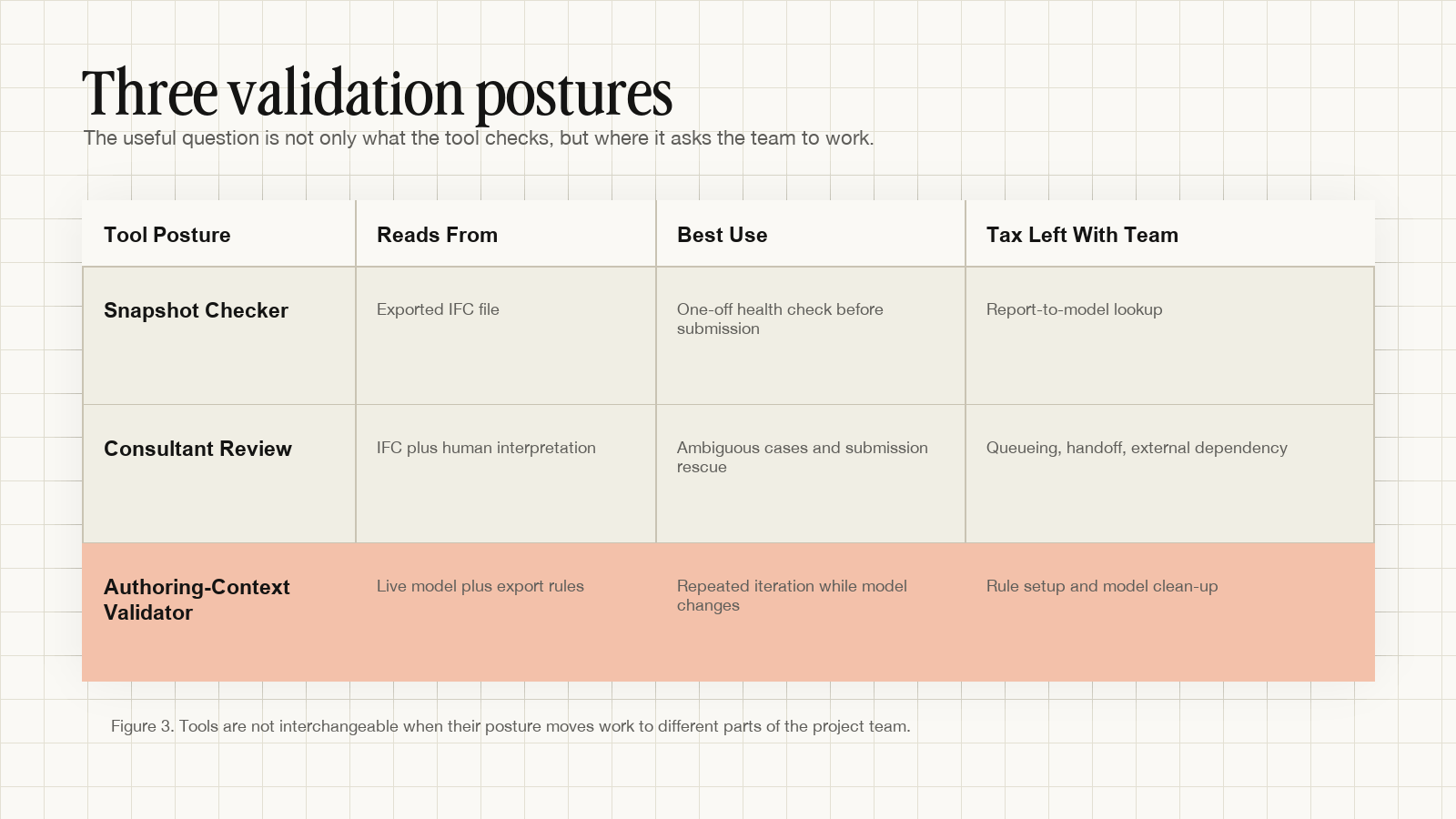
A snapshot checker is useful when you need an independent read of an IFC file. It is especially useful near submission, when you want to know whether the file you are about to send is structurally acceptable.
A consultant review is useful when the model needs judgment, negotiation, or rescue. Some failures are not just missing parameters. They involve modelling choices, project constraints, and agency interpretation. Human review still matters.
An authoring-context validator is useful when the model is still moving. That is where repeated iteration happens. The team needs to know whether the live model is getting closer to a valid export, not merely whether yesterday's snapshot had problems.
This distinction is already visible in general-purpose model-checking tools. Autodesk's Model Checker for Revit, for example, can run reports inside a Revit model and zoom to non-compliant elements from report results. The lesson is not that every practice should use one tool. The lesson is that location matters. When the report and the fix live closer together, the loop gets shorter.
What to test before you choose a validator
Do not only test whether a tool finds errors. Test what happens after it finds them.
Time the whole loop. Start the clock before export and stop it only when the corrected model is ready for the next check. Include export time, upload time, report interpretation, Revit lookup, fixing, and re-export.
Test a moving model. If your team workshares during submission week, simulate that condition. Change a room number, a wall type, or a parameter after export. Then ask how the report behaves. Does the team know what is stale?
Separate health check from production workflow. A web validator may be excellent for a one-off external check. That does not mean it should be the repeated daily loop while the model is still changing.
Ask who pays the triage cost. If the tool returns 120 flags, who decides which ones matter? If the answer is “the project team,” that cost belongs in the evaluation.
Check whether the tool supports the decision you are actually making. A final IFC check supports submission confidence. An in-model check supports iteration. A consultant review supports interpretation. Those are different decisions.
What Senibina is testing
Senibina is studying this as a workflow tax problem, not only a validation accuracy problem.
Gateway is our current experiment in rule-aware IFC-SG preparation inside Revit. The point is not to replace every external check. External checks still matter. The point is to move repeated feedback earlier, while the model, the element, and the fix are still in the same working context.
We are also building local IFC inspection tools in Labs because not every check needs an account, an upload, or a consulting funnel. Practitioners need lightweight tools for reading files, understanding what changed, and deciding what to fix next.
The research direction is simple: if a team has to pay a workflow tax, make the tax visible. Then decide whether the tool is still free.
Senibina studies where AEC coordination breaks, then turns those field notes into workflow experiments and practical tools. If your practice is preparing for CORENET X and wants to study validation workflows before they become submission-week emergencies, get in touch.
For related notes, read Filled is not compliant, Why Does CORENET X Validation Fail After Export?, and How to Validate CORENET X Compliance Before IFC Export.
Related resources
- Free CORENET X Parameter Lookup ToolSearch 500+ IFC-SG parameters instantly
- Senibina-Gateway, IFC-SG Preparation Inside RevitPrepare before you export
- More Research notes on IFC-SG preparation