Product UpdatesAutodeskADNBIMRevitProductFeatured
The trust stack under Revit add-ins
ADN membership is less about a logo and more about the support path behind Revit add-ins when API behaviour, version changes, and project deadlines collide.
Adib Zailan
March 15, 2026Updated June 23, 2026
7 min read
A badge is easy to photograph. Reliability is harder to see.
That is the useful way to think about Autodesk Developer Network membership. The public signal is simple: a company building on Autodesk technology has been accepted into Autodesk's developer program. The practical question is quieter: what changes when a Revit add-in hits an edge case, a version change, or a deadline?
Senibina was accepted into Autodesk Developer Network in March 2026. We could treat that as a logo announcement. But the badge is not the point.
The point is the support path behind the tools that project teams rely on.
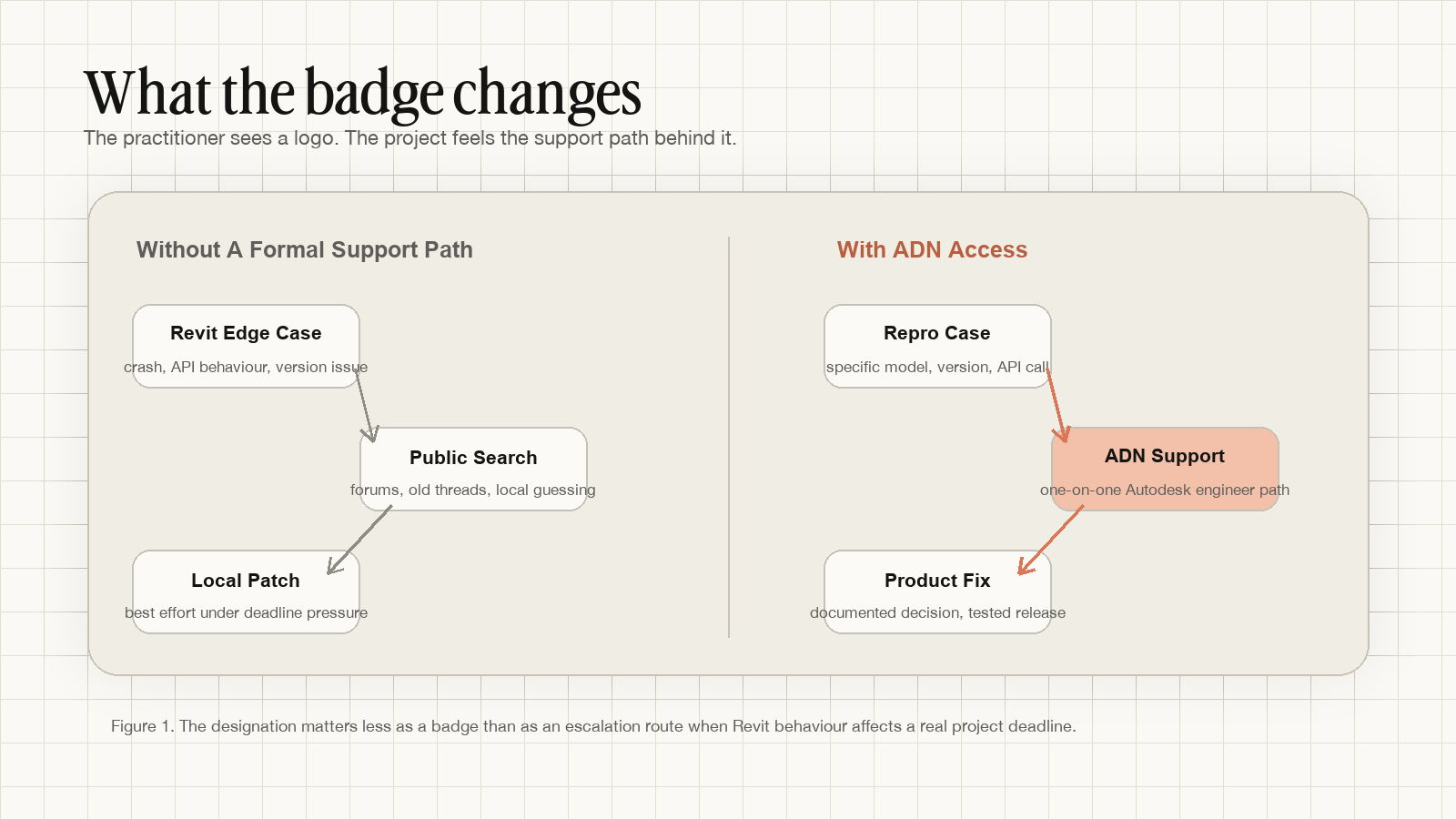
Observation: Revit add-ins do not fail in marketing pages
Most Revit add-ins look trustworthy before you install them. The landing page is polished. The screenshots are convincing. The demo video shows a clean model, a predictable command, and a happy result.
Then the tool meets a practice.
The model is not clean. The Revit version is not the latest one. The office is worksharing. The project has legacy families, mixed naming conventions, linked files, and a deadline that does not care whether an API call behaves differently between releases.
This is where add-in reliability is decided. Not by the first demo, but by what happens after the first strange failure.
Does the developer have access to the Revit versions users are actually running? Can they reproduce a version-specific bug? Can they distinguish their own bug from a platform behaviour? Can they ask Autodesk a precise technical question when the public documentation is not enough?
That is the part of the product users rarely see.
What Autodesk says ADN provides
Autodesk describes Autodesk Developer Network as a program for software development businesses and teams that develop specialized solutions and integrations with Autodesk technology. In the more detailed ADN membership documentation, Autodesk lists benefits that include access to Autodesk software for development and support, access to pre-release beta versions of future Autodesk software releases, one-on-one technical support from an Autodesk software engineer, and access to confidential information.
Those are developer-layer benefits. They do not automatically make a product good. They do not guarantee a clean model, a perfect installer, or instant support.
But they change the conditions under which a developer builds and maintains the product.
That matters for Revit because Revit add-ins are not just web apps wearing an AEC label. Autodesk's own Revit API documentation describes Revit's .NET API as a way to automate repetitive tasks and extend core software functionality. In other words, the add-in sits close to the project file, the authoring tool, and the user's production environment.
When that layer breaks, the issue is rarely abstract.
From program benefit to project effect
The practical value of ADN membership is translation.
Autodesk lists program benefits. A practice experiences those benefits as fewer support dead ends, better version coverage, and less waiting after a Revit release changes something important.
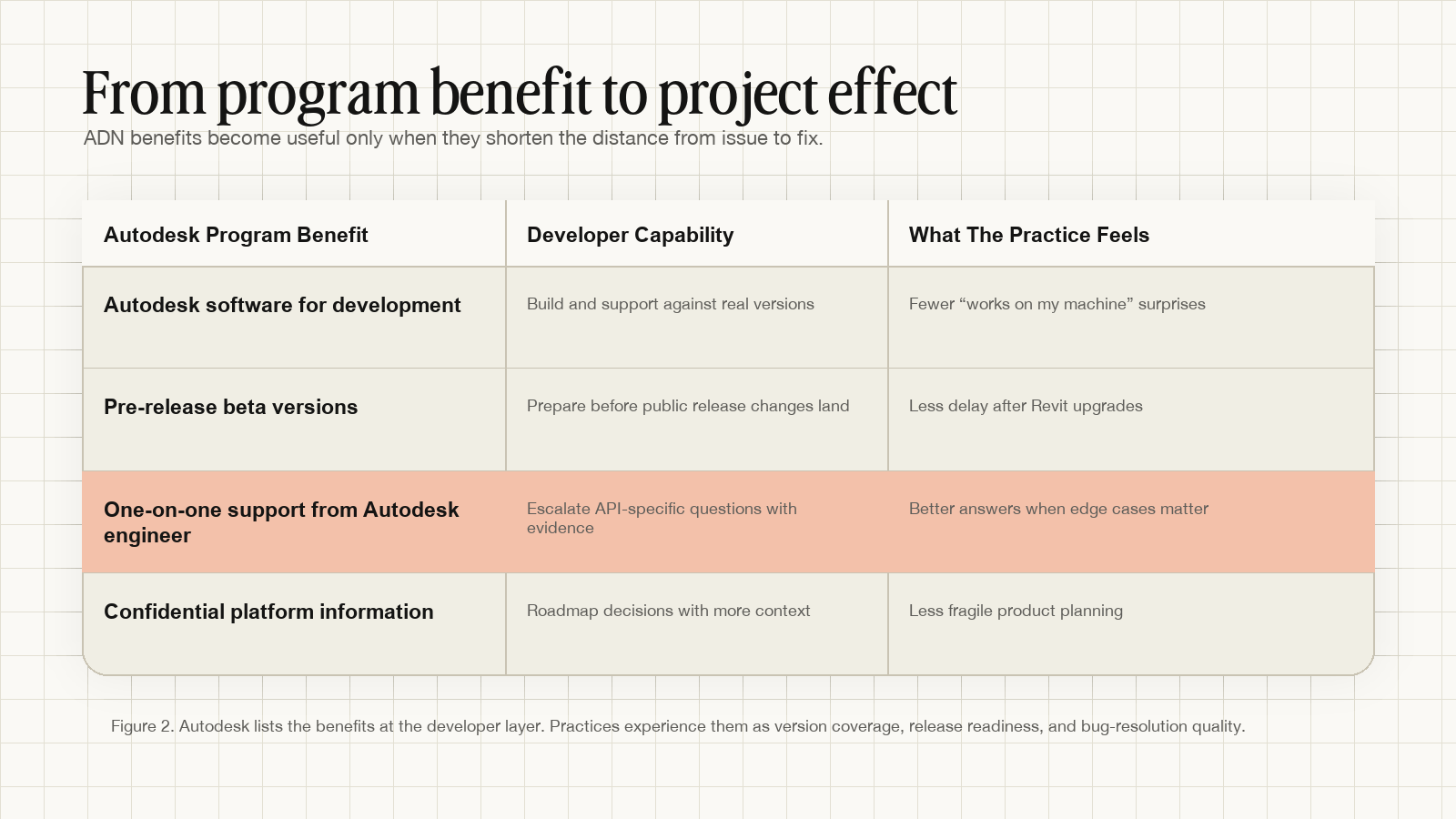
Access to Autodesk software for development and support means the developer can test against real product versions, not only the one installed on a single workstation.
Access to pre-release beta versions means a developer can prepare for future releases before users are forced to decide whether an upgrade will break their toolchain.
One-on-one support from an Autodesk software engineer means API-specific questions can be escalated with a reproducible case, rather than guessed through old forum threads and isolated experiments.
Confidential platform information means product planning can be less reactive. It does not mean every roadmap detail can be discussed publicly. It means the developer has more context when deciding how to maintain tools that sit on top of Autodesk products.
For a practice, the question is not whether the developer has a badge. The question is whether the developer can maintain the lower layers of trust.
The trust stack below a polished demo
A polished demo proves that a tool can work in one scenario. It does not prove that the tool will behave across project models, Revit releases, team environments, or submission deadlines.
The visible product is only the top layer.
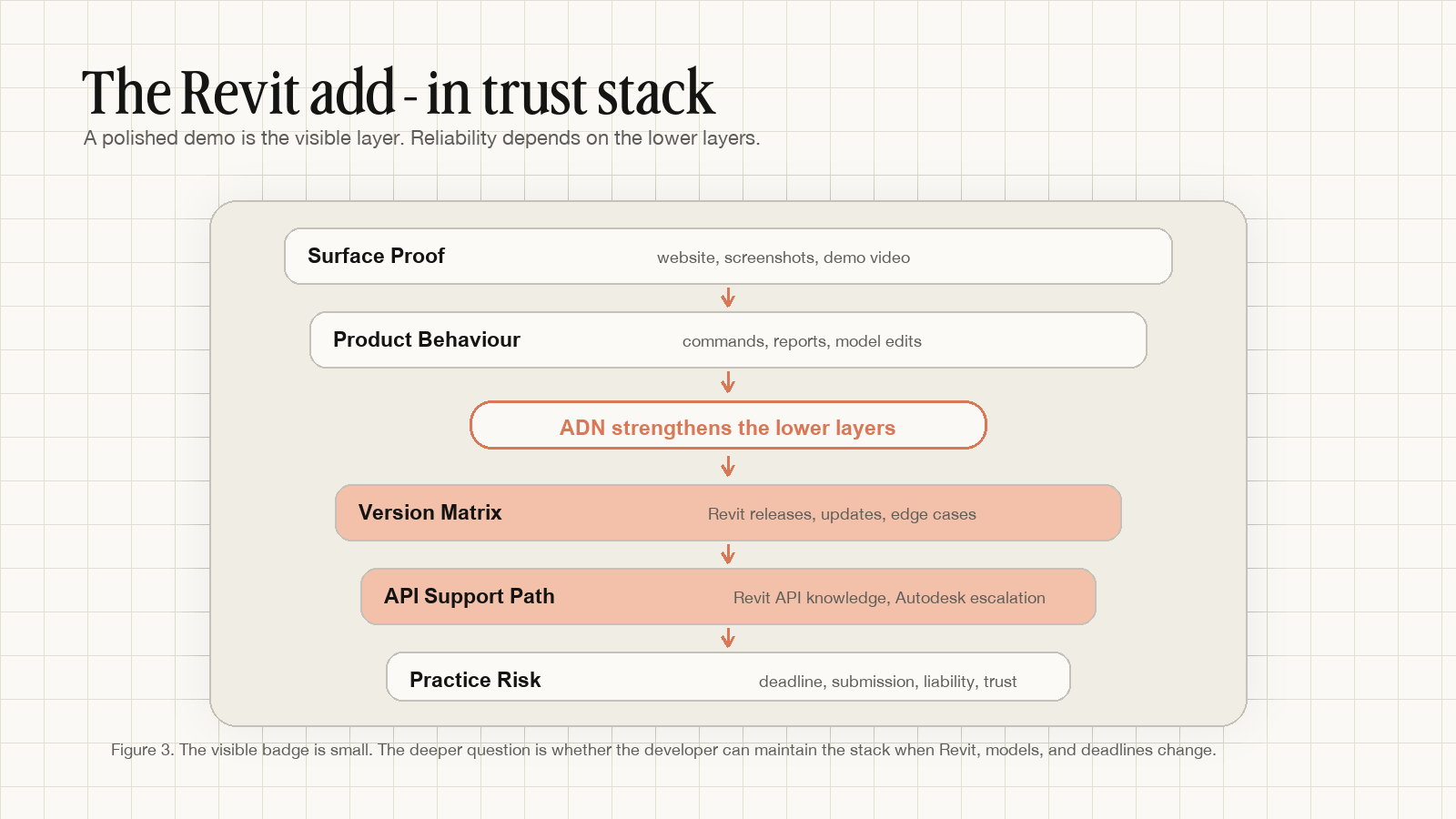
The trust stack starts with surface proof: the website, the screenshots, the demo video. Those matter. Practitioners need to see what a tool does before they try it.
Below that is product behaviour: commands, reports, model edits, exports, logs, installers, and the ordinary details that decide whether a tool fits into practice.
Below that is the version matrix: Revit releases, updates, API changes, Windows conditions, installer paths, and the office reality that not every project upgrades at the same time.
Below that is the support path: how the developer investigates a failure when their own code, Autodesk API behaviour, and project-specific conditions are all possible causes.
At the bottom is practice risk. A tool failure is not only a software inconvenience when it appears during a submission window. It can displace coordination time, create uncertainty, and force teams back into manual workarounds.
ADN membership strengthens the lower layers. It does not replace them.
What this does not prove
It is important not to overstate the claim.
ADN membership does not mean Autodesk has certified every product decision. It does not mean every bug will be solved immediately. It does not mean users should skip their own testing, procurement checks, or pilot workflows.
A non-ADN developer can still build excellent tools. An ADN member can still build a weak product. The designation is not a substitute for release discipline.
It is a signal about support infrastructure.
That is why the badge should be treated as one part of a larger evaluation. Ask what Revit versions are supported. Ask how bugs are reproduced. Ask whether release notes name fixed issues clearly. Ask what happens when your project runs an older Revit version. Ask how quickly a developer tests against a new release.
Those questions reveal whether platform access has become product reliability.
What this means for Senibina tools
For Senibina, ADN membership marks a transition from using Autodesk tools inside practice to building on top of them with a more formal platform relationship.
Gateway is our experiment in rule-aware IFC-SG preparation inside Revit. Bridge handles geometry movement between design and BIM environments. Both depend on the same underlying reality: AEC tools are only useful if they survive contact with real project files, version differences, and team deadlines.
ADN does not make that work easy. It gives us a better route through the hard parts.
That route matters as Singapore practices prepare for CORENET X, as Revit versions keep changing, and as teams expect add-ins to behave like dependable project infrastructure rather than experimental scripts.
So yes, Senibina is now an Autodesk Developer Network member.
But the more important statement is this: we are building the lower layers, not just the visible badge.
Senibina studies where AEC coordination breaks, then turns those field notes into workflow experiments and practical tools. If your practice is evaluating Revit add-ins for CORENET X, IFC-SG preparation, or design-to-documentation coordination, get in touch.
For related notes, read The tool was free. The afternoon was not., Filled is not compliant, and How to Validate CORENET X Compliance Before IFC Export.
Related resources
- Free CORENET X Parameter Lookup ToolSearch 500+ IFC-SG parameters instantly
- Senibina-Gateway, IFC-SG Preparation Inside RevitPrepare before you export
- More Research notes on IFC-SG preparation